
Understanding primaries and secondaries
Updated 3 September 2026
Most of GetCalendario is one person syncing their own calendars. Secondary accounts are for the other case: somebody else's calendar needs to be part of your picture, and you should not have to know their password to do it.
The two roles
A primary owns a subscription. They build connections, decide what syncs, and pay.
A secondary is somebody who has given a primary access to their calendar. They do not pay, they do not build connections, and they are on the primary's plan.
The relationship runs one way. A primary invites a secondary; the secondary grants access to a calendar. It is not a mutual arrangement and it is not a shared login.
What each side can actually do
| | Primary | Secondary | |---|---|---| | Build and edit connections | Yes | No | | Choose which calendars sync | Yes | No | | Stop an event syncing entirely | Yes | No | | Hide the details of their own events | Yes | Yes | | Invite other people | Yes | No | | Manage the subscription and billing | Yes | No |
The row that surprises people is the third. A secondary cannot stop an event syncing. If they could, they could silently blank out time on a calendar that is not theirs, and the calendar's owner would have no way of knowing something was missing. What a secondary can always do is hide the details — the event still travels, the time is still blocked, but the title, notes and location do not come with it.
Where the rules apply is different too
This is the part worth reading twice, because the two roles behave differently and both behaviours are deliberate.
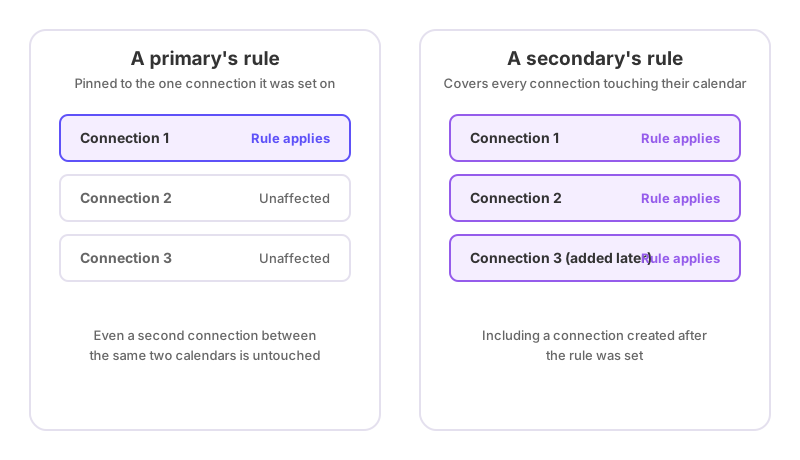
A primary's rule belongs to one connection. Set it on the connection from your work calendar to your personal one, and it does nothing to any other connection. If you want the same rule in two places, apply it to both when you create it — they are then two independent rules, and editing one will not change the other.
A secondary's rule follows their calendar. It applies to every connection that touches it, including connections built later. Somebody who says "never show the details of anything on my calendar called Therapy" should not have to say it again each time the primary builds another connection.
A person can be both
Somebody with their own GetCalendario account can also be another primary's secondary. An assistant who syncs their own two calendars, and also gives an executive visibility of their work diary, is one account doing both jobs.
When that happens:
- They keep their own subscription. Being invited never moves anybody onto somebody else's plan or off their own.
- They keep full control of their own connections, filters and billing.
- On the calendar they have shared, they are a secondary, with the limits in the table above.
Their own account carries on exactly as it did. The invitation adds a relationship; it does not replace one.
Limits and corner cases
One primary per person. You can be a secondary for one primary at a time. An assistant with two executives cannot serve both from a single account today. The database enforces it, so it fails clearly rather than doing something unpredictable.
You cannot invite yourself. It is refused with a message rather than quietly creating a loop.
Your plan sets how many secondaries you can have. Basic includes one, Premium four, Pro unlimited. If you are already at your limit, remove somebody before inviting the next person. Nobody is ever removed automatically to make room.
Removing a secondary stops the sharing, not their account. They keep their login and anything of their own. What ends is the primary's access to their calendar.
A secondary sees a smaller app. Three items rather than seven, because a console built for managing many connections is noise for somebody whose whole involvement is one shared calendar. Somebody who is both a primary and a secondary sees the full app, because they have their own account to run.
Both people's rules apply to a shared connection. When a connection touches a calendar owned by somebody else, the rules consulted are the connection owner's and the calendar owner's. Filters are restrictions, so the safest reading wins: if either person's rule says hide the details, the details are hidden.
When this is the wrong tool
If the other person does not need to keep control of their own calendar — if it is genuinely your calendar, on another account you own — connect it as one of your own calendar accounts instead. Secondary accounts exist for the case where the calendar belongs to somebody else and should stay that way.
If you want somebody to see your availability without any of this, share a link instead. It is read-only, needs no account at either end, and can be revoked whenever you like.