
A shared family calendar across Google and Microsoft
Updated 11 October 2026
One of you is on Google Calendar, the other is on Outlook.com or Microsoft 365, and the kids' school runs everything through whichever one the school uses. Nobody can see the whole household's schedule in one place, so pickups get missed, appointments overlap, and "I thought you had it" comes up more often than it should.
GetCalendario doesn't require everyone to move to the same provider. It connects calendars from Google and Microsoft — Google Calendar, Outlook.com, Microsoft 365, and Exchange Online — into a shared calendar that shows the whole family's commitments regardless of which system each event started on.
The setup
Pick one calendar to act as the shared family calendar — it can live on either provider, and often it's a calendar created specifically for this rather than anyone's personal one. Then build a one-way connection from each person's calendar into it:
- Parent A's calendar (Google) → shared calendar
- Parent B's calendar (Microsoft) → shared calendar
- Add a third for a teenager's calendar, or a fourth for the household's school-events calendar, following the same pattern.
Each one shows on Home as its own connection. Here, a parent's work Outlook calendar feeding a Google Family calendar:
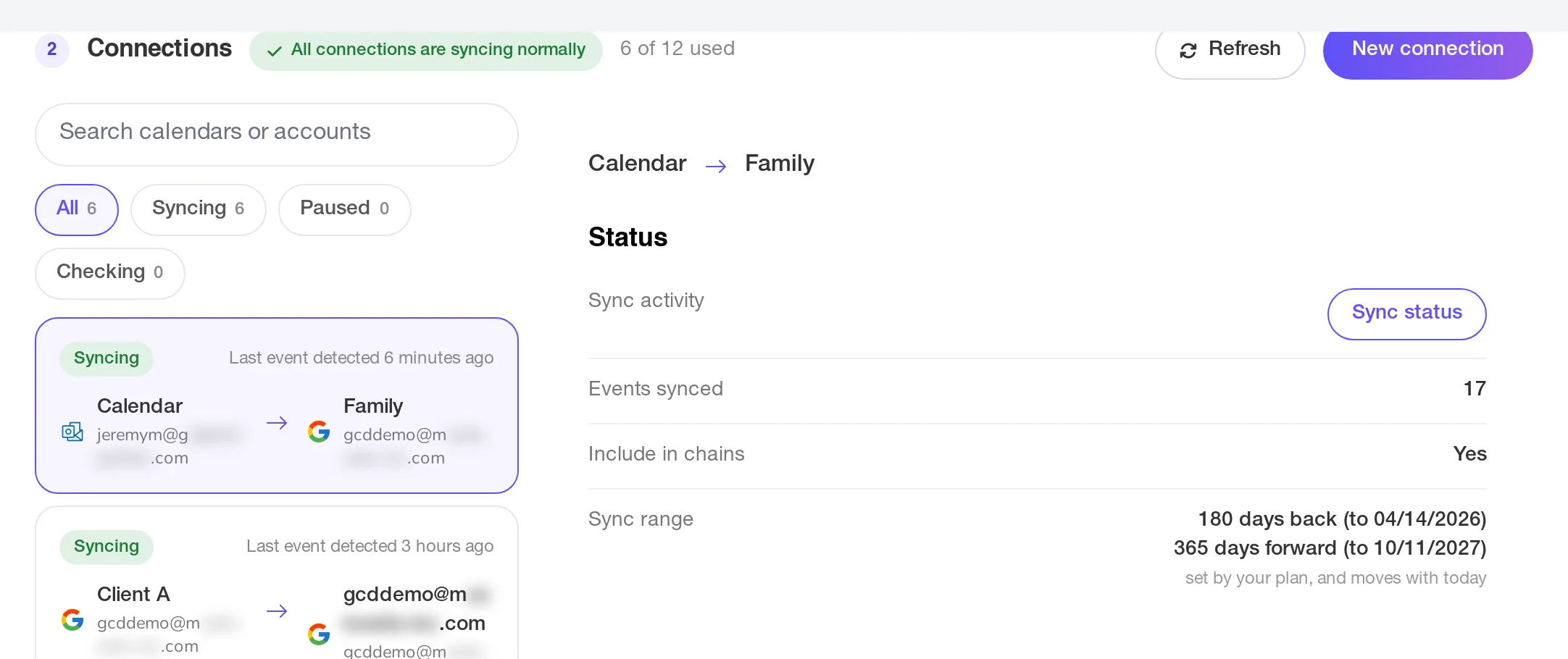
Each of these is its own connection, configured on its own: its own choice of full detail or placeholder, its own rules, its own pause switch. There's no group setting that applies to "the family" as a unit — each source calendar gets connected in individually.
If anyone in the family wants to see the shared calendar reflected back on their own — so a change made directly on the shared calendar shows up on their personal one too — that's a separate connection running the other way, shared calendar → their calendar, set up independently of the one feeding into it.
Who owns which rules
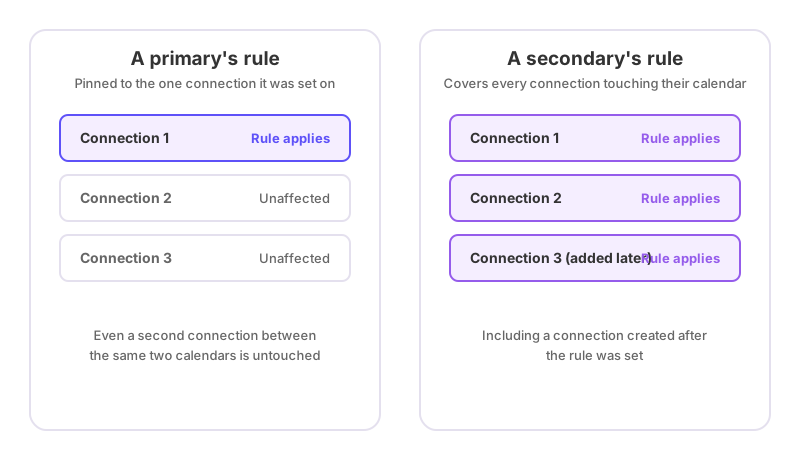
Whoever creates a connection is its primary account holder, and their rules are pinned to that one connection. If Parent A sets up the connection from their own calendar into the shared one, any "Don't Sync" or redact rule they add there only affects that connection.
The shared calendar itself is a secondary in each of the connections writing to it. Whoever manages that calendar can set redact rules on it — hiding the title, description and location of matching events while still blocking the time — and those rules apply across every connection feeding that calendar, including ones added later for a new family member's calendar. What a secondary can't do is stop an event from syncing outright; only the person who owns the originating connection (Parent A, for their own connection) can set a rule that drops an event entirely rather than blocking the time with details hidden. See how to stop certain events from syncing and how to hide event details but keep the time blocked for the difference.
What everyone sees
Anyone looking at the shared calendar sees a merged view of every connected family member's commitments, at whatever level of detail each connection was set to. A parent's work meeting might show as a full-detail entry or a bare "Busy" block, depending on how that connection was configured — it's decided per source, not applied uniformly across the household.
Both the individual connections and any redact rules on the shared calendar only reach events inside the plan's sync window — a number of days back and forward from today, set by the plan. Something scheduled further out than that isn't picked up until it moves inside the window.
Deletions and reschedules sync the same way as new events, and silently — nobody on the original invite gets an email because a copy appeared or vanished from the shared calendar, so a cancelled appointment just quietly disappears rather than generating a notification to whoever created it.
If it looks wrong
If one family member's events aren't reaching the shared calendar, check that connection specifically — it can be paused or filtered independently of everyone else's. Why is my calendar not syncing is the place to start. If an event is showing up with less detail than expected, check whether a redact rule set on the shared calendar (rather than on the individual connection) is responsible — that would explain why it's happening consistently across more than one family member's events rather than just one connection's. And if something recently reappeared or vanished across a batch of events, a keyword being added or removed on a rule is the likely cause; see what happens when I add or delete a rule keyword.