
How an assistant manages an executive's calendar
Updated 3 September 2026
You're the assistant, and half your job is knowing where the executive is supposed to be — except you're working off a calendar invite you were cc'd on three weeks ago, a verbal update from Tuesday, and whatever didn't get lost in between. Or you're the executive, and you're tired of relaying every reschedule by message because your assistant's calendar has no idea your 2pm just moved.
The fix is a connection from the executive's calendar to the assistant's, so the assistant's calendar becomes a live copy of what the executive is actually doing, without either of you keeping it updated by hand.
The setup
This is the executive's connection, because it's the executive's calendar that's the source: executive's calendar → assistant's calendar. It's one-way — events flow from the executive to the assistant, not the other way — so if the assistant needs the executive to see their availability too, that's a second connection running in the opposite direction, set up and configured separately.
The executive is the primary account holder in this relationship: it's their calendar being connected out, so it's their connection to own, pause, or rule. The assistant, receiving the copy, is the secondary — their calendar is the destination, not the source of the connection.
Detail level is worth deciding deliberately here. Full detail means the assistant sees everything — titles, descriptions, locations — which is usually the point of the exercise. But if some of the executive's calendar is genuinely private (a medical appointment, an interview, a personal matter), a rule on this connection can either drop those events from the assistant's calendar entirely or keep the time blocked while hiding what it's for.
What the assistant sees
Once the connection is running, every qualifying event on the executive's calendar shows up on the assistant's, at whatever level of detail the connection is set to and after any rules the executive has applied. The assistant can then work from that copy to book around it, move things, or field scheduling requests, all without pinging the executive to ask what's already on their calendar.
What the assistant can — and can't — do about it
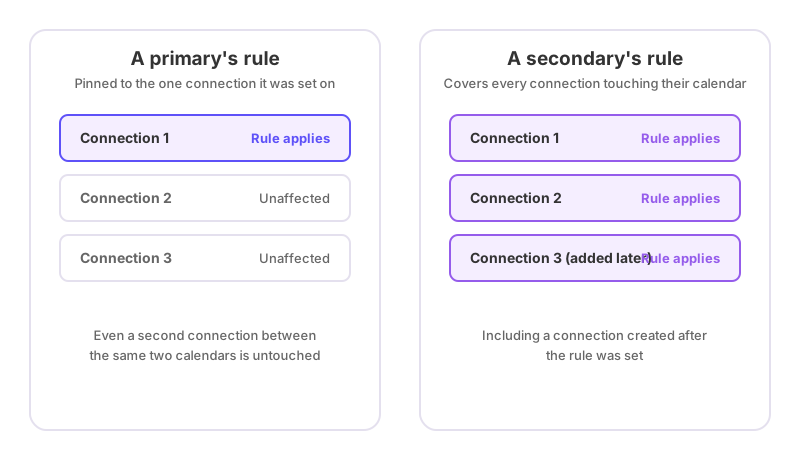
Because the assistant is a secondary here, the redact rules they can set on their own calendar are calendar-scoped, not connection-scoped. If the assistant sets a rule to hide the details of anything matching a certain keyword, that rule applies to every connection writing to their calendar — including one the executive might set up later, or one from someone else entirely who starts syncing into the same calendar. It isn't attached to just this one connection.
What the assistant's rule can never do is stop an event from syncing outright. A secondary can only redact — blank out the title, description and location while still blocking the time. Only the connection's owner, the executive in this case, can set a rule that drops an event from syncing at all. If something is showing up on the assistant's calendar that shouldn't be there, hiding its details is within the assistant's control; keeping it off entirely is not — that request goes to the executive, who can add a "Don't Sync" rule on the connection itself. See how to stop certain events from syncing for how that rule works and why it's restricted to the connection's owner, and how to hide event details but keep the time blocked for what the assistant's own redact rule can do.
If it looks wrong
If an event the executive expects the assistant to see isn't showing up, check whether it falls inside the plan's sync window — a number of days back and forward, set by the plan — since anything outside it isn't evaluated by the connection at all. See how far back and forward does calendar sync go. If an event is showing with full details when it shouldn't, or missing when it should be there, check whether a keyword rule recently changed — adding or removing one re-evaluates everything already synced within the window, within seconds, so a recent edit to a rule is often the explanation. What happens when I add or delete a rule keyword has the mechanics. And if the assistant's own redact rule seems to be reaching connections they didn't expect it to, that's expected behaviour for a secondary's rule, not a bug — it covers every connection touching their calendar, present and future.