
How far back and forward does calendar sync go?
Updated 3 September 2026
An event you'd expect to have synced by now might just be outside the range GetCalendario is currently looking at. Every connection only acts within a window of days around today, and understanding that window explains a lot of "it should be there but isn't."
What the sync window is
A connection doesn't scan a source calendar's entire history and every future event on it. It only considers events dated within a window: a number of days in the past and a number of days in the future, both measured from today. Anything dated further back or further ahead than that simply isn't part of what the connection is currently evaluating.
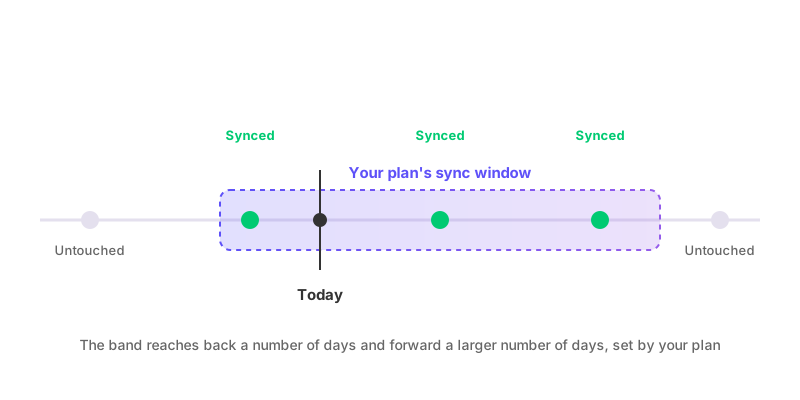
Where the window comes from
The window is set by your plan, not by anything you configure on an individual connection. Different plans allow different ranges, and the exact number of days back and days forward isn't fixed — it depends on what you're subscribed to. Because of that, don't assume a specific range applies to your account; check your plan's details rather than treating any particular number of days as a rule that applies everywhere.
Events outside the window are frozen, not evaluated
This is the part that catches people out: an event outside the sync window isn't skipped as "not synced yet" in the sense of being queued for later. It isn't looked at at all, in either direction. If it already has a copy on the destination calendar from an earlier sync, that copy stays exactly as it is — GetCalendario isn't checking whether the original changed, whether it should still be there, or whether a filter now applies to it. If it never had a copy, nothing creates one purely because time has passed while it sits outside the window.
What happens as the window moves
The window moves forward with today, a day at a time. An event that's currently too far in the future will eventually fall inside the window as the date approaches, and once it does, it starts being evaluated like anything else already in range — synced, filtered, or ignored based on the same rules as any other event. But this only works moving forward: nothing catches up retroactively for an event that's already passed out of range on the near side. If it was inside the window last month and dropped out of range without a copy being created or updated, it stays that way.
Why a filter added later won't touch an old copy outside the window
Adding or removing a keyword on a sync filter re-evaluates matching events immediately, but only the ones currently inside the sync window. If you added a filter today that would have removed a copy from six months ago, and that event is outside your plan's window, the existing copy is left alone — the filter never gets to look at it. The same is true in reverse: deleting a keyword won't restore an old copy that sits outside the window either. See what happens when I add or delete a filter keyword for the full mechanics of that.
Checking whether an event is in range
If an event isn't syncing and you suspect the window is why, compare its date against today rather than guessing. An event just inside the boundary today will start behaving normally tomorrow if it's moving further into the window, or drop out of consideration if it's moving away from today on the near edge. If the window itself seems too narrow for how you use your calendars, that's a question about your plan, not a setting to change on the connection. Why is my calendar not syncing walks through the sync window alongside the other usual suspects, in the order worth checking them.