
What happens when I add or delete a filter keyword?
Updated 3 September 2026
You just added or removed a keyword on a sync filter, and now you're looking at your destination calendar wondering whether anything actually happened — or worrying that it just quietly touched events that had already synced. It did, and it did it fast.
Adding a keyword
A filter matches events by title, description, location or private status, and a keyword narrows that match. The moment you add a keyword and save, GetCalendario doesn't wait for the next scheduled sync — it goes back over events already sitting on the destination calendar that match the filter and re-evaluates every one of them, within seconds.
What happens to a matching event depends on the filter's type. A filter set to stop events syncing deletes any already-copied event that now matches. A filter set to hide details instead strips the copy down: the time still blocks out on the calendar, but the title, description and location disappear and the copy is marked private. Either way, this reaches events that synced before you ever added the keyword — not just ones that sync from now on.
Deleting a keyword
Deleting a keyword undoes the same check in reverse, just as quickly. Events that were being removed or stripped because they matched that keyword get re-evaluated, and if nothing else about them still triggers the filter, they come back: a dropped event resyncs, and a redacted event regains its full details. You don't need to trigger a manual resync — removing the keyword is what starts the pass.
How far back it reaches
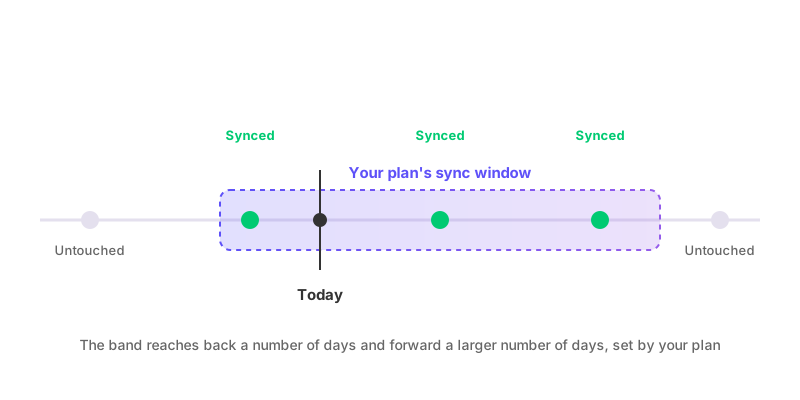
Both directions are bounded by your plan's sync window — a number of days in the past and a number of days forward from today, set by your plan rather than something you configure per filter. An event dated outside that window keeps whatever state it already has, in either direction. Adding a keyword won't reach out and remove a copy that's outside the window, and deleting a keyword won't restore one out there either — it's simply not looked at. See how far back and forward does calendar sync go for what actually sets that window.
Nobody gets an email about it
None of this generates a notification. GetCalendario never copies the original event's attendees onto a synced copy in the first place, and every write or delete it sends to Google or Microsoft explicitly tells the provider not to notify anyone. So when a keyword change makes a batch of events disappear or reappear on a destination calendar, nobody on the original invite gets an email about it — including the person the destination calendar belongs to, unless they happen to be looking at it.
If your connection is paused
Nothing above happens while the connection carrying the filter is paused. You can still add or delete a keyword on a paused connection's filter — that just changes the rule itself — but nothing on the destination calendar moves until the connection resumes. Once it does, the same catch-up pass runs then: any event inside the sync window that the rule now reaches gets removed or restored at that point, not before.
If you're trying to work out which connections a given filter actually reaches before you touch a keyword, that depends on whether you're the primary account holder or a secondary. How to stop certain events from syncing and how to hide event details but keep the time blocked cover how each type of filter is scoped and who can set which one.