
The team engagement digest
Updated 18 October 2026
The engagement digest is an email with the numbers from the Engagement tab of People & Team: how many members are using GetCalendario, who needs a nudge, whose sync broke, and what changed since the last one. It saves opening the dashboard to find out whether anything needs you. The dashboard itself is described in Team engagement: who's using it.
Who gets it
Everyone who can see engagement: the Owner, and anyone in a group with See engagement. Admins have it from the start. See Team groups and permissions. Members never get it.
How often: each reader chooses
Each person who gets the digest picks their own schedule. Changing yours never changes anyone else's.
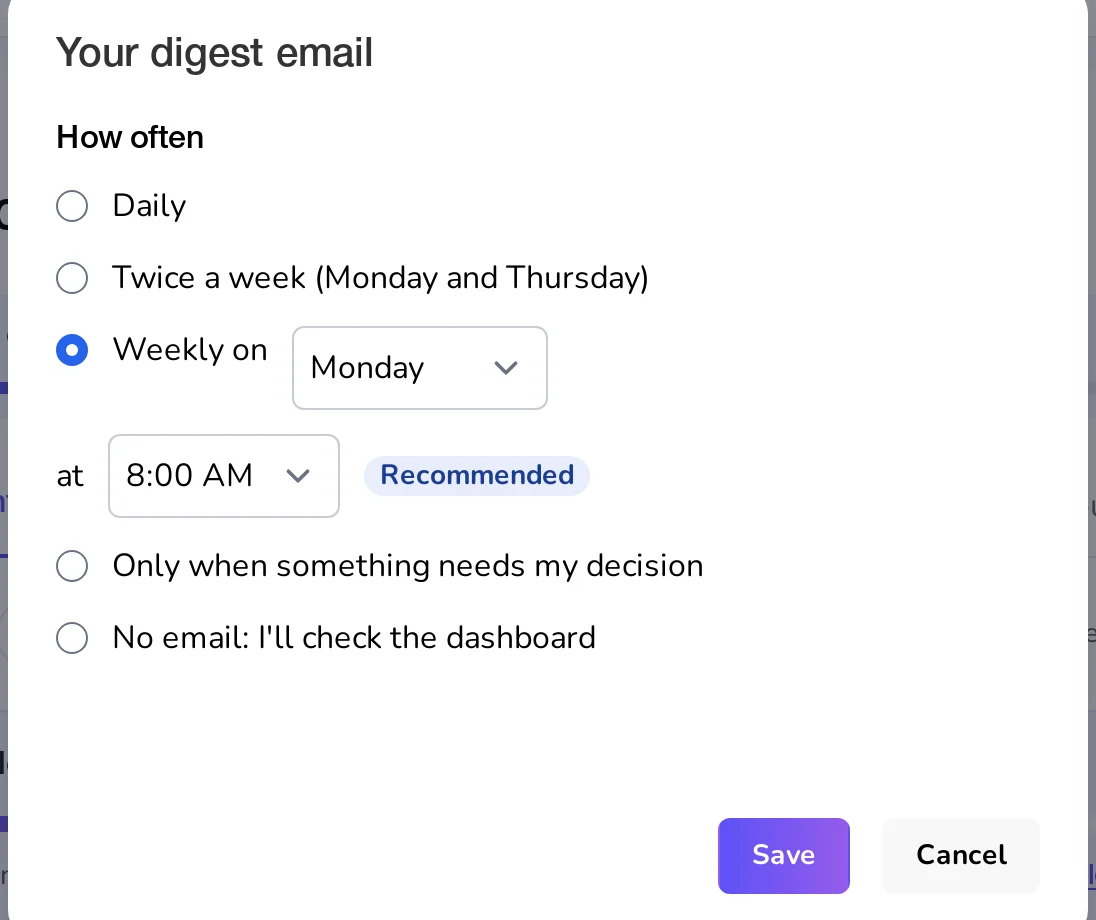
- Daily, at the time you pick.
- Twice a week (Monday and Thursday), at the time you pick.
- Weekly on a day and at a time you pick. This is recommended, and it is where everyone starts: Mondays at 8:00 AM.
- Only when something needs my decision: an email at your chosen time, only on a day when someone new reached "Auto-Nudge stopped" or a sync newly broke. Otherwise nothing.
- No email: I'll check the dashboard.
Times are in your own time zone. To change it, open Engagement and click Change next to "Digest" at the top, or use Report & nudge settings. Every digest also ends with a Change how often link.
The digest is also listed as Team engagement digest in the Teams group of Settings → Email & notifications, with Right away or Off and a Change how often link. Off there, or Unsubscribe in your mail app, stops it whatever schedule you chose. See Your message center and email notifications. It is never folded into your personal daily or weekly summary, because it is about the team, not you.
What's in it
Whoever can nudge members chooses what the digest holds, for everyone who gets it, under The digest email on Report & nudge settings. A new team's Owner sees this right after creating the team.
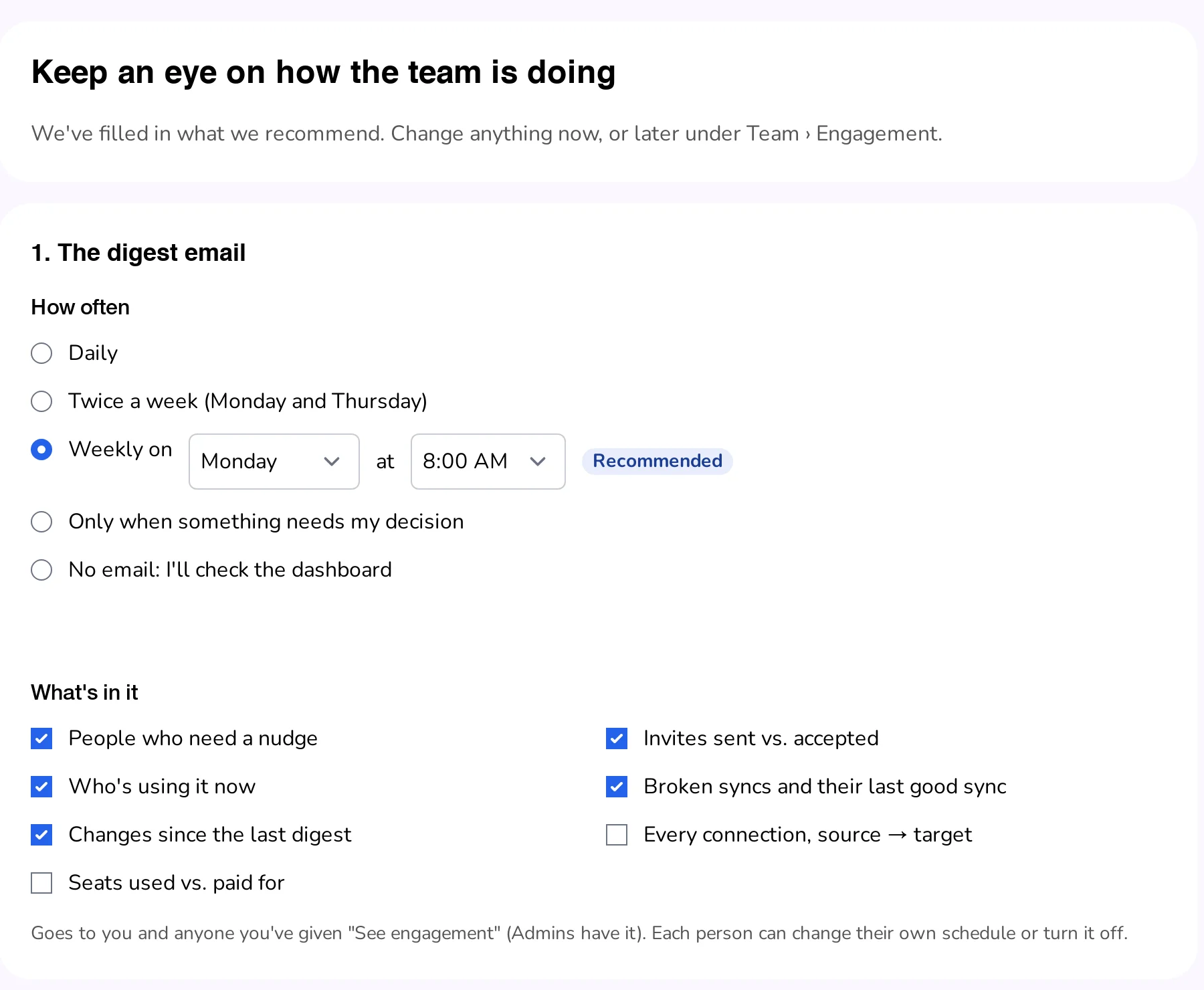
Every digest starts the same way:
- The headline, such as "6 of 9 members are using GetCalendario", and "Up from 5 last time" when it changed. While a team is still forming, a line above it counts down to the team trial.
- Three boxes: invites accepted out of sent, connections healthy out of the total, and calendars connected.
- Needs your decision: people Auto-Nudge has stopped on, how many times they were nudged, and a Decide link.
- Being nudged automatically: who Auto-Nudge is working on and when the next nudge is due.
Then the sections the team chose:
| Section | Starts | What it lists |
|---|---|---|
| People who need a nudge | On | Name, problem and detail |
| Invites sent vs. accepted | On | Invitations still waiting, and how long ago each was sent |
| Who's using it now | On | The names of the members using it |
| Broken syncs and their last good sync | On | Each connection that needs attention, with its last good sync |
| Changes since the last digest | On | How many joined, connections added and syncs newly broken |
| Every connection, source → target | Off | Every connection the team can see, with its health |
| Seats used vs. paid for | Off | "8 of 10 seats used", once the team is paying |
A long list shows the first few and links to the rest. The email ends with Open the Team Dashboard.
Connections in the digest follow the same rules as the dashboard: personal connections are left out, and a Sponsored member's own calendars may show only as provider and domain. See What a team can and cannot see.
Every link opens the matching list
Each name and number in the digest opens the Engagement tab with the matching list already picked, such as People filtered to Invite waiting. The digest, the Overview and the lists are worked out the same way, so their numbers agree.
"Since your last digest"
Each digest remembers what it told you, so the next can say what changed: "Since the last digest: +2 joined · +3 connections · 1 newly broken." The headline's "Up from 5 last time" works the same way. Your first digest, with nothing to compare with, covers the last 7 days.
The Overview on the Engagement tab uses your own last digest too: "Since your last digest (Monday)". Someone who gets theirs daily sees a different line from someone who gets it weekly. With no digest yet, it reads "In the last 7 days."