
How to set up two-way calendar sync
Updated 3 September 2026
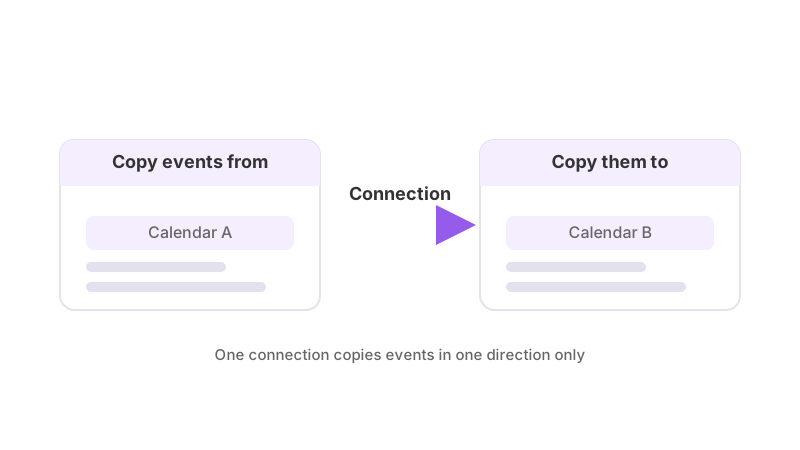
The single most common mix-up in calendar sync is assuming that connecting two calendars automatically keeps them in sync both ways. In GetCalendario, it doesn't. A connection is one-way: it copies events from a source calendar to a destination calendar, and nothing travels back the other way through that same connection. Getting a genuine two-way sync means building two of them.
What a connection actually does
A connection has exactly one source and one destination. When you create it, you pick which calendar events come from and which calendar they get copied to, choose whether to copy full details or just a placeholder, and decide whether the copy is public or marked private. All of that only ever affects traffic moving in that one direction.
This isn't a limitation you can toggle off — it's the shape of the feature. Each connection is tracked, filtered, and tested independently of any other connection, including one running between the exact same two calendars in the opposite direction.
Building two-way sync
To keep two calendars showing the same events regardless of which one someone edits, set up two connections:
- Connection one: Calendar A → Calendar B.
- Connection two: Calendar B → Calendar A.
Each goes through its own setup — its own choice of full detail vs. placeholder, its own title and description overrides, its own privacy setting, and its own Test Flight check before it starts syncing anything real. Building the first connection does not create the second one for you, and there's no single switch that turns a one-way connection into a two-way one — the second connection is a separate thing you add.
This is exactly the shape used in syncing Google Calendar with Outlook, syncing two Google Calendars, syncing Microsoft 365 with Google Calendar, and syncing Exchange Online with Google Calendar — the provider pair changes, but the one-way-times-two structure doesn't.
Source and destination calendars
Every connection has exactly one source calendar and one destination calendar. The source is where events come from; the destination is where they get copied to. Those are roles, not fixed properties of a calendar — the same calendar can be a source in one connection and a destination in another, which is exactly what building a two-way sync does. Inside a single connection, though, the direction only ever runs one way: events flow from source to destination, never the reverse.
Chain or connection chain
A connection chain is what you get when connections are strung together so that one connection's destination calendar is the next connection's source calendar — Calendar A → Calendar B → Calendar C, and so on. Chaining is how a single event can end up copied across several calendars in sequence, but each link in the chain is still its own connection with its own settings: an override or filter set on one hop doesn't carry through to the next one.
Mistakes this causes
Only setting up one connection, then wondering why edits on the destination calendar never show up on the source. That calendar was never a source for anything — it's only ever been written to.
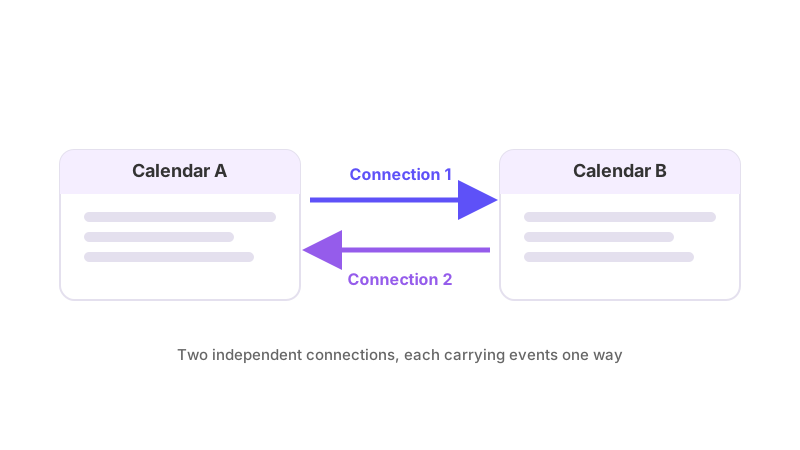
Assuming settings carry across both directions. If Calendar A → Calendar B is set to copy full details, but Calendar B → Calendar A copies only a placeholder, that's not a bug — they're two independent connections and were configured that way (deliberately or not). Check both if a change on one side isn't behaving like the equivalent change on the other.
Assuming a filter on one connection protects the other. A filter that stops an event syncing, or hides its details, is attached to a single connection. Setting a filter on Calendar A → Calendar B has no effect on what Calendar B → Calendar A does with the same event.
What both connections share, once running
Both connections still only act on events inside your plan's sync window — a number of days back and a number of days forward, set by your plan. An event outside that window on either side isn't evaluated by either connection until it moves inside it.
Deletions sync in both directions too, and do so silently: no attendee is ever copied onto a synced event, so nobody on the original invite is notified because a copy appeared or disappeared on the other calendar.
If one direction is working and the other isn't, don't assume the problem is symmetrical — each connection can be paused, filtered, or failing Test Flight independently of the other. Why is my calendar not syncing walks through the checks in the order to run them.